
Overview
The API gateway handles the authentication, caching, and routing of incoming requests. Built in Rust for high performance, it integrates Redis for dynamic model configuration and API key-based authentication, enabling multi-tenant support and runtime configuration updates without service restarts. This allows the system to serve different models to different users based on their API keys.
Architecture Components
1. Redis Client
The Redis client manages real-time synchronization of model configurations and API keys:Key Patterns
model_table:{model_id}- Stores model provider configurationsapi_key:{api_key}- Stores API key to model mappings
Event Subscriptions
__keyevent@*__:set- Captures new/updated keys__keyevent@*__:del- Captures deleted keys__keyevent@*__:expired- Captures expired keys
Initialization Flow
- On startup, fetches all existing
model_table:*andapi_key:*keys - Subscribes to keyspace notifications for real-time updates
- Maintains connection with automatic reconnection logic
2. Authentication Middleware
The authentication system validates API keys and maps user-facing model names to internal model/endpoint IDs:Request Flow
- Extracts API key from
Authorizationheader (supports “Bearer” prefix) - Validates key exists in the auth state
- Retrieves model mapping for the API key
- Modifies request body: replaces the
modelfield with an internal model reference used for routing - Passes modified request to downstream handlers
Key Features
- Thread-safe with RwLock for concurrent access
- Dynamic updates without service restart
- Graceful handling of missing keys
3. In-Memory Model Table
Manages model configurations and routing:Model Configuration Structure
Validation
- Prevents use of reserved internal prefixes in model names
- Validates model exists before returning configuration
4. OpenAI-Compatible Endpoint
Handles the model resolution after authentication:Model Name Parsing
- Detects the internal model reference pattern set by the auth middleware
- Extracts model ID for table lookup
- Falls back to function name resolution if not a model reference
Performance
Performance benchmark of LLaMa3.2 1B using Bud, VLLM and Aibrix.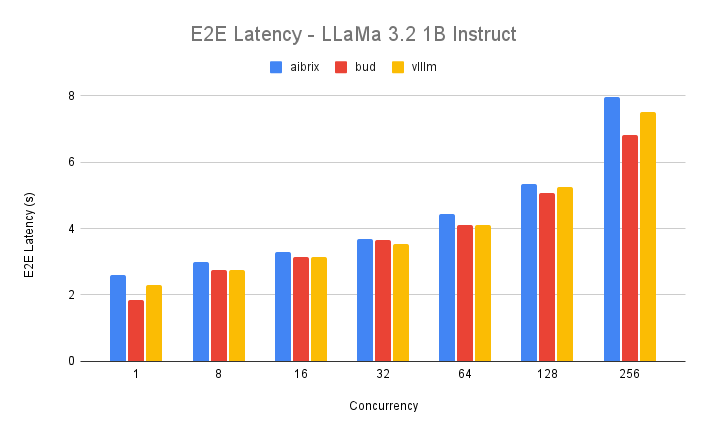
Data Flow
1. Configuration Update Flow
- External system sets key in Redis (e.g.,
api_key:xyzormodel_table:abc) - Redis publishes keyspace notification
- Redis client receives event and fetches updated value
- Updates appropriate in-memory state (Auth or ModelTable)
2. Request Authentication Flow
- Client sends request with API key in Authorization header
- Auth middleware validates key and retrieves model mapping
- Modifies request to include internal model ID
- OpenAI endpoint resolves model ID to provider configuration
- Routes request to appropriate provider
Redis Data Structures
API Key Structure
Model Table Structure
Configuration
Environment Variables
TENSORZERO_REDIS_URL- Redis connection string (e.g.,redis://default:password@localhost:6379)
Benefits
- Dynamic Configuration: Add/remove models and API keys without restarting the service
- Multi-Tenancy: Different API keys can access different models
- Real-time Updates: Changes take effect immediately via Redis pub/sub
- Scalability: Multiple gateway instances can share the same Redis backend
- Isolation: Each tenant’s model access is isolated by their API key
Troubleshooting
Common Issues
-
Redis Connection Failed
- Check
TENSORZERO_REDIS_URLis correctly formatted - Verify Redis is running and accessible
- Check network connectivity
- Check
-
API Key Not Working
- Verify key exists in Redis with correct format
- Check model ID mapping is valid
- Ensure Redis events are enabled (
notify-keyspace-eventsconfig)
-
Model Not Found
- Verify model table entry exists in Redis
- Check model ID matches between API key mapping and model table
- Validate JSON structure in Redis