> ## Documentation Index
> Fetch the complete documentation index at: https://docs.budecosystem.com/llms.txt
> Use this file to discover all available pages before exploring further.
# Introduction to Deployments
> Launch, use, and publish model endpoints from your project workspace
## Overview
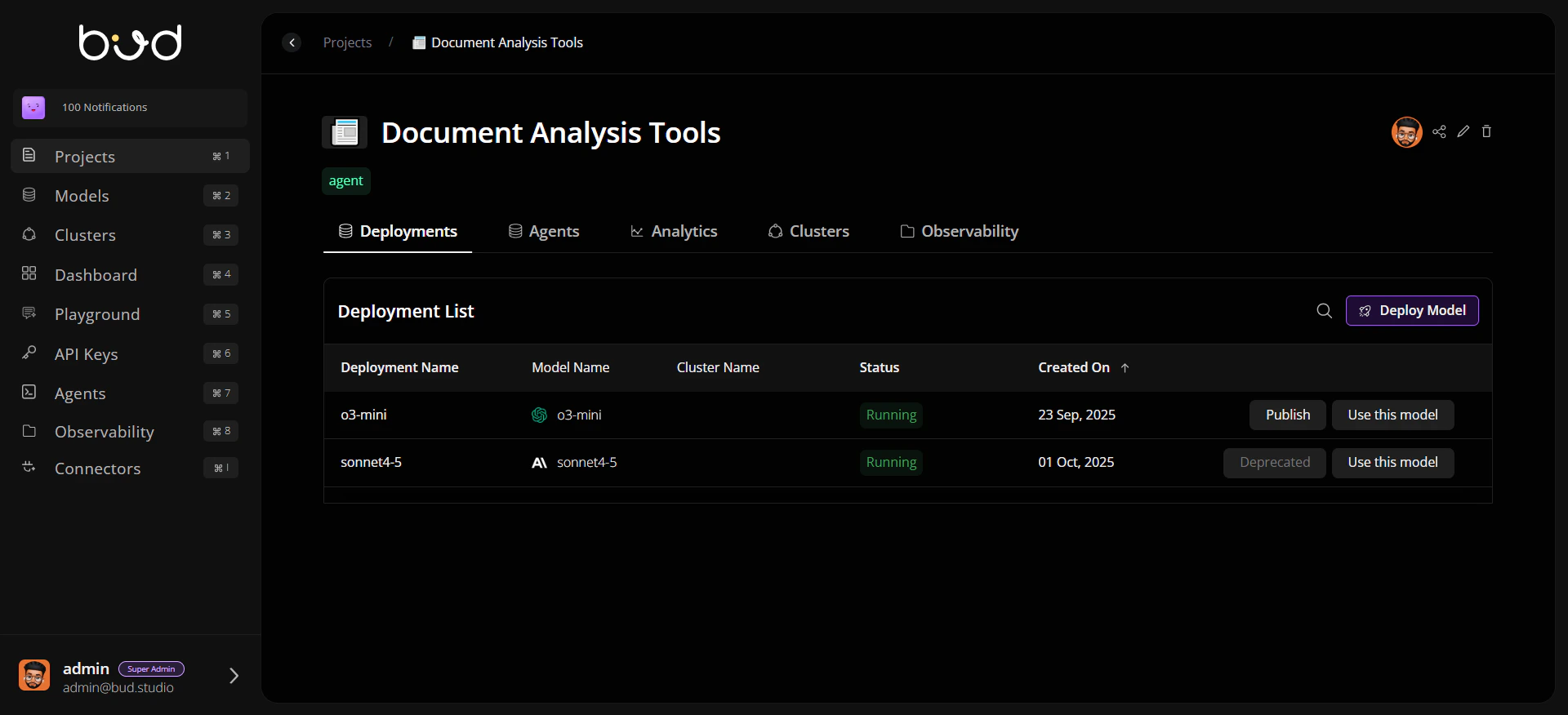
The **Deployments** module is where a project turns models into live endpoints. It centralizes endpoint creation, runtime tuning, publishing, and lifecycle operations for both cloud and local models.
From a single project tab, teams can deploy workloads, monitor status, control reliability policies, and expose approved endpoints to downstream consumers.
 ## Why Deployments Matter
**Immediate endpoint usability after deploy** Once a model is deployed and active, the endpoint is available. Use **Use this model** to copy cURL, Python, or JavaScript snippets for integration.
**Separate publish workflow for customer portal** **Publish** is used to expose models in the **Customer Dashboard portal** with pricing metadata for customer consumption.
**Built-in reliability controls** Configure retries, fallback chains, and rate limiting directly from deployment settings.
**Production visibility** Track endpoint health and review runtime details through deployment-level tabs.
## Deployment Lifecycle
```mermaid theme={null}
flowchart LR
A[Select Model] --> B[Choose Cluster & Runtime Targets]
B --> C[Create Deployment]
C --> D[Endpoint Becomes Usable]
D --> E[Configure Reliability Settings]
E --> F[Use this model: Copy Code Snippets]
E --> G[Publish to Customer Dashboard Portal]
G --> H[Monitor and Iterate]
```
## Core Areas in Deployments
| Area | What you can do |
| ------------------- | ------------------------------------------------------------- |
| **Deployment List** | Search, filter, deploy, publish, and manage project endpoints |
| **General Tab** | Review model/cluster metadata and deployment status |
| **Workers Tab** | Inspect and scale workers for local deployments |
| **Settings Tab** | Set rate limits, retries, and fallback behavior |
## Typical Workflow
1. Open a project and navigate to **Deployments**.
2. Deploy a model with the right cluster and runtime profile.
3. Validate endpoint readiness from deployment details.
4. Use **Use this model** to copy integration snippets and test endpoint calls.
5. Publish with pricing metadata only when you want the model available in the **Customer Dashboard portal**.
## Getting Started
Launch your first deployment in minutes
Understand endpoint usage, publish behavior, and lifecycle states
Build and publish a first deployment with best practices
## Why Deployments Matter
**Immediate endpoint usability after deploy** Once a model is deployed and active, the endpoint is available. Use **Use this model** to copy cURL, Python, or JavaScript snippets for integration.
**Separate publish workflow for customer portal** **Publish** is used to expose models in the **Customer Dashboard portal** with pricing metadata for customer consumption.
**Built-in reliability controls** Configure retries, fallback chains, and rate limiting directly from deployment settings.
**Production visibility** Track endpoint health and review runtime details through deployment-level tabs.
## Deployment Lifecycle
```mermaid theme={null}
flowchart LR
A[Select Model] --> B[Choose Cluster & Runtime Targets]
B --> C[Create Deployment]
C --> D[Endpoint Becomes Usable]
D --> E[Configure Reliability Settings]
E --> F[Use this model: Copy Code Snippets]
E --> G[Publish to Customer Dashboard Portal]
G --> H[Monitor and Iterate]
```
## Core Areas in Deployments
| Area | What you can do |
| ------------------- | ------------------------------------------------------------- |
| **Deployment List** | Search, filter, deploy, publish, and manage project endpoints |
| **General Tab** | Review model/cluster metadata and deployment status |
| **Workers Tab** | Inspect and scale workers for local deployments |
| **Settings Tab** | Set rate limits, retries, and fallback behavior |
## Typical Workflow
1. Open a project and navigate to **Deployments**.
2. Deploy a model with the right cluster and runtime profile.
3. Validate endpoint readiness from deployment details.
4. Use **Use this model** to copy integration snippets and test endpoint calls.
5. Publish with pricing metadata only when you want the model available in the **Customer Dashboard portal**.
## Getting Started
Launch your first deployment in minutes
Understand endpoint usage, publish behavior, and lifecycle states
Build and publish a first deployment with best practices