> ## Documentation Index
> Fetch the complete documentation index at: https://docs.budecosystem.com/llms.txt
> Use this file to discover all available pages before exploring further.
# Introduction to Clusters
> Register, operate, and govern clusters for Bud workloads
## Overview
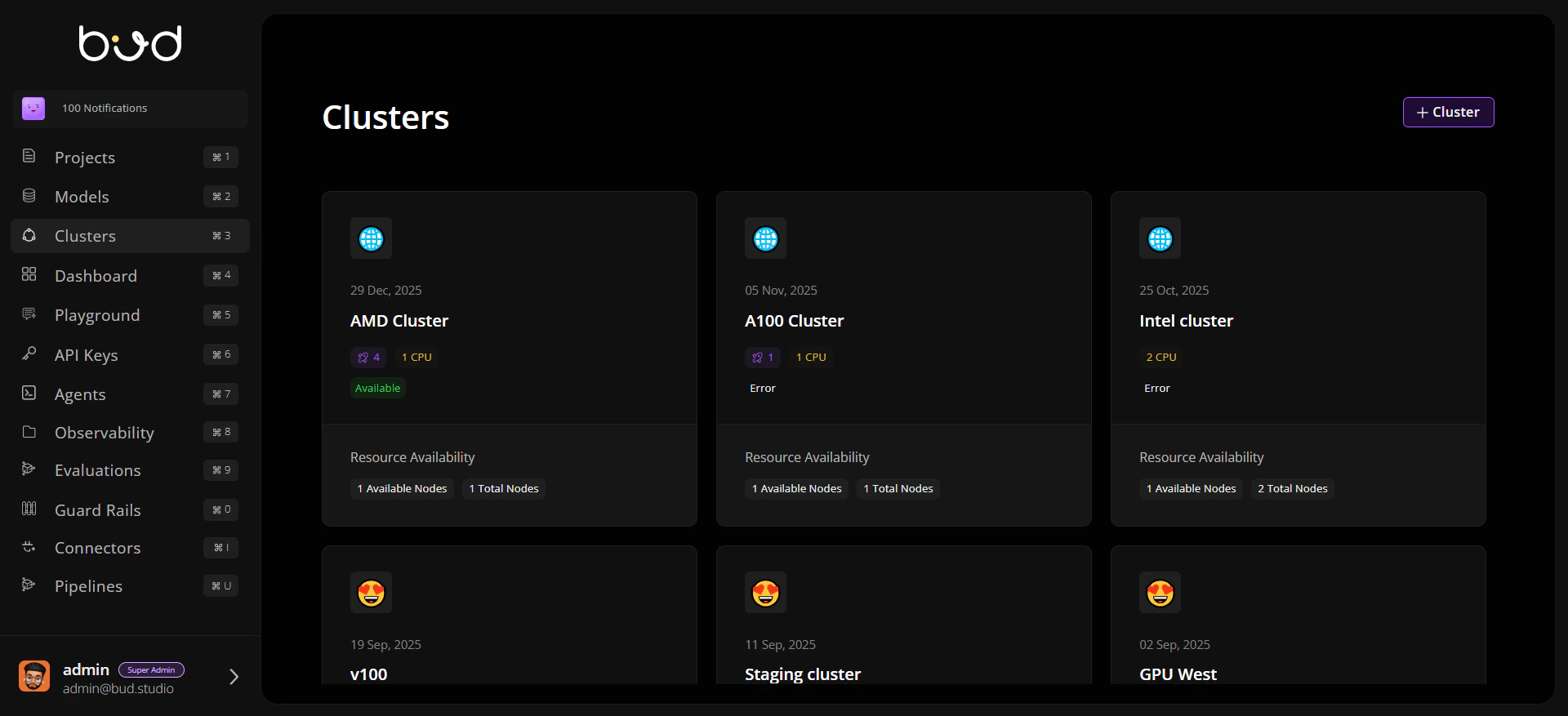
The **Clusters** module is Bud's infrastructure control plane for model-serving and evaluation workloads. It gives platform teams a single place to onboard clusters, track health, manage node capacity, and apply runtime defaults.
Whether you run GPU-heavy production inference or mixed CPU/GPU environments, Clusters helps you keep operations reliable and auditable.
 ## Why Clusters Matter
**Unified infrastructure visibility** Track capacity, status, and deployments across all connected clusters.
**Safe cluster lifecycle operations** Add, edit, and remove clusters with guardrails for active deployments.
**Hardware-aware planning** Understand CPU/GPU/HPU/TPU availability, worker utilization, and scaling readiness.
**Operational defaults at cluster level** Configure storage classes and access modes once and reuse across deployments.
## Cluster Lifecycle in Bud
```mermaid theme={null}
flowchart LR
A[Register or Connect Cluster] --> B[Validate Health and Inventory]
B --> C[Run Deployments]
C --> D[Monitor Nodes and Metrics]
D --> E[Tune Settings and Storage Defaults]
E --> F[Scale, Maintain, or Decommission]
```
## Core Areas in the Clusters Module
| Area | What you can do |
| ------------------- | ---------------------------------------------------------- |
| **Cluster List** | View all clusters, hardware profile, endpoints, and status |
| **General Tab** | Review node and resource summaries with utilization trends |
| **Deployments Tab** | Inspect deployments running on the selected cluster |
| **Nodes Tab** | Analyze per-node status, capacity, and events |
| **Analytics Tab** | Review cluster-level metrics and usage views |
| **Settings Tab** | Configure default storage class and access mode |
## Who Uses This Module
* **Platform / Infra teams** managing capacity and reliability.
* **MLOps teams** validating where models should run.
* **Security and governance leads** auditing cluster operations and permissions.
## Getting Started
Register your first cluster and verify readiness
Learn module structure, tabs, and lifecycle concepts
Walk through creation, validation, and operations
## Why Clusters Matter
**Unified infrastructure visibility** Track capacity, status, and deployments across all connected clusters.
**Safe cluster lifecycle operations** Add, edit, and remove clusters with guardrails for active deployments.
**Hardware-aware planning** Understand CPU/GPU/HPU/TPU availability, worker utilization, and scaling readiness.
**Operational defaults at cluster level** Configure storage classes and access modes once and reuse across deployments.
## Cluster Lifecycle in Bud
```mermaid theme={null}
flowchart LR
A[Register or Connect Cluster] --> B[Validate Health and Inventory]
B --> C[Run Deployments]
C --> D[Monitor Nodes and Metrics]
D --> E[Tune Settings and Storage Defaults]
E --> F[Scale, Maintain, or Decommission]
```
## Core Areas in the Clusters Module
| Area | What you can do |
| ------------------- | ---------------------------------------------------------- |
| **Cluster List** | View all clusters, hardware profile, endpoints, and status |
| **General Tab** | Review node and resource summaries with utilization trends |
| **Deployments Tab** | Inspect deployments running on the selected cluster |
| **Nodes Tab** | Analyze per-node status, capacity, and events |
| **Analytics Tab** | Review cluster-level metrics and usage views |
| **Settings Tab** | Configure default storage class and access mode |
## Who Uses This Module
* **Platform / Infra teams** managing capacity and reliability.
* **MLOps teams** validating where models should run.
* **Security and governance leads** auditing cluster operations and permissions.
## Getting Started
Register your first cluster and verify readiness
Learn module structure, tabs, and lifecycle concepts
Walk through creation, validation, and operations