> ## Documentation Index
> Fetch the complete documentation index at: https://docs.budecosystem.com/llms.txt
> Use this file to discover all available pages before exploring further.
# Creating Your First API Integration
> Step-by-step tutorial to wire a project endpoint into an application
## Goal
Integrate one deployed endpoint into an application service with secure auth, robust request handling, and baseline observability.
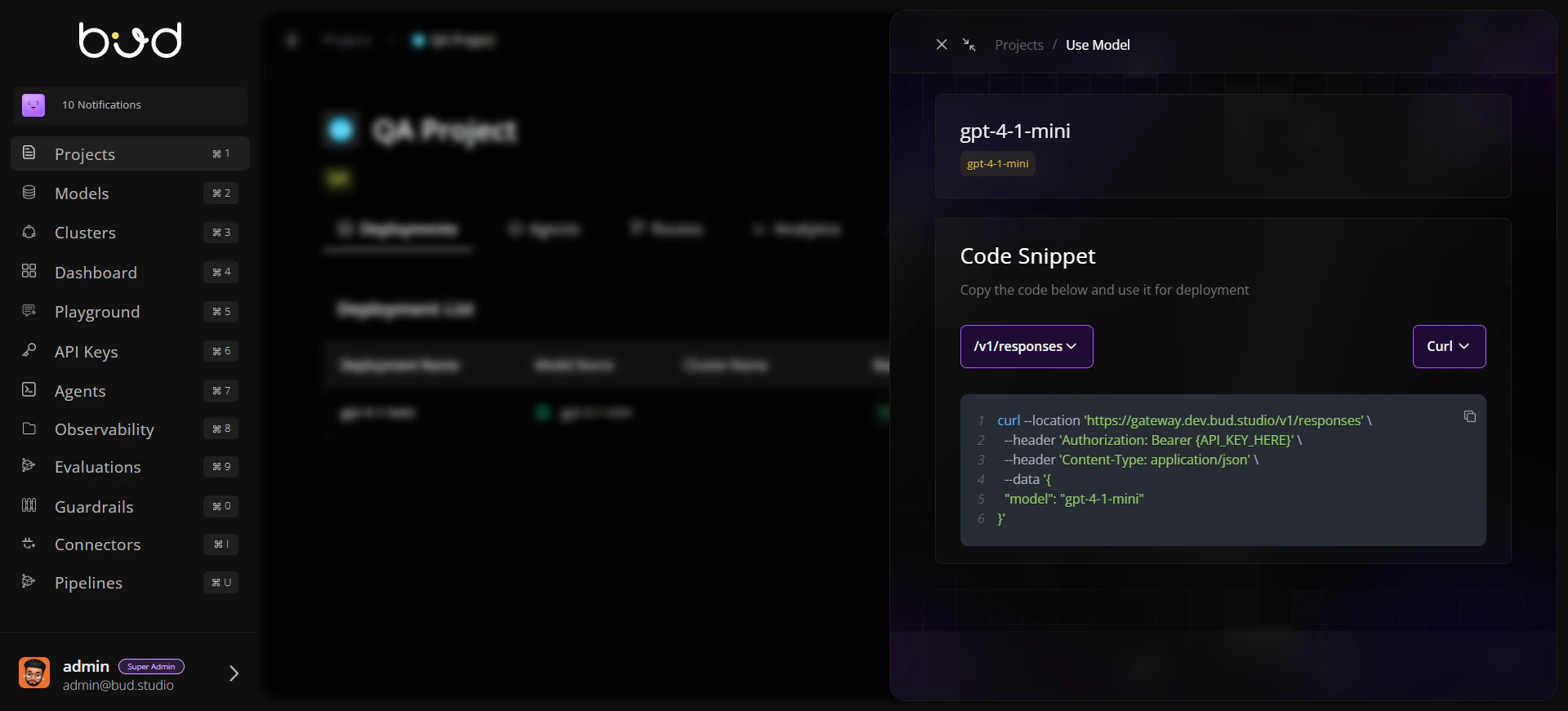
## Step 1: Prepare Endpoint Information
From your project, open **Use this model** and collect:
* Base URL
* Endpoint path
* Model name
* Endpoint type (chat, embedding, image, audio, etc.)
 ## Step 2: Create an API key
1. Go to API Keys from the navigation.
2. Open the projects tab.
3. Create new key for the required project containing endpoint.
## Step 3: Send a Test Request
```bash theme={null}
curl --location 'https://YOUR_BASE_URL/v1/chat/completions' \
--header 'Authorization: Bearer YOUR_API_KEY' \
--header 'Content-Type: application/json' \
--data '{
"model": "YOUR_MODEL_NAME",
"messages": [{"role": "user", "content": "Give me a one-line summary of Bud AI Foundry."}],
"max_tokens": 128
}'
```
## Step 4: Validate Response and Move to Application Code
* Verify the response from the test request returns a 200 status code and the expected payload.
* When moving to your application code, consider enabling streaming to process the response incrementally.
## Step 5: Add Retry and Error Mapping
Implement client-side handling:
* Retry `429` and `5xx` with backoff.
* Surface `401/403` as credential/permission issues.
* Treat `400/422` as payload validation errors.
## Step 6: Add Monitoring Hooks
Capture and store:
* Request ID (if available)
* Endpoint URL/path
* Status code
* Latency
* Token/request usage metrics
## Validation Checklist
Request succeeds with valid key and payload
Invalid key returns expected auth error handling
Retry path works for simulated transient failures
Logs include endpoint, status, and latency fields
## Next Steps
Proceed to advanced usage:
* [Guides](/api-integration/guides/openai-compatible-clients)
* [Reference](/api-integration/reference/request-response-reference)
* [Troubleshooting](/api-integration/troubleshooting)
## Step 2: Create an API key
1. Go to API Keys from the navigation.
2. Open the projects tab.
3. Create new key for the required project containing endpoint.
## Step 3: Send a Test Request
```bash theme={null}
curl --location 'https://YOUR_BASE_URL/v1/chat/completions' \
--header 'Authorization: Bearer YOUR_API_KEY' \
--header 'Content-Type: application/json' \
--data '{
"model": "YOUR_MODEL_NAME",
"messages": [{"role": "user", "content": "Give me a one-line summary of Bud AI Foundry."}],
"max_tokens": 128
}'
```
## Step 4: Validate Response and Move to Application Code
* Verify the response from the test request returns a 200 status code and the expected payload.
* When moving to your application code, consider enabling streaming to process the response incrementally.
## Step 5: Add Retry and Error Mapping
Implement client-side handling:
* Retry `429` and `5xx` with backoff.
* Surface `401/403` as credential/permission issues.
* Treat `400/422` as payload validation errors.
## Step 6: Add Monitoring Hooks
Capture and store:
* Request ID (if available)
* Endpoint URL/path
* Status code
* Latency
* Token/request usage metrics
## Validation Checklist
Request succeeds with valid key and payload
Invalid key returns expected auth error handling
Retry path works for simulated transient failures
Logs include endpoint, status, and latency fields
## Next Steps
Proceed to advanced usage:
* [Guides](/api-integration/guides/openai-compatible-clients)
* [Reference](/api-integration/reference/request-response-reference)
* [Troubleshooting](/api-integration/troubleshooting)